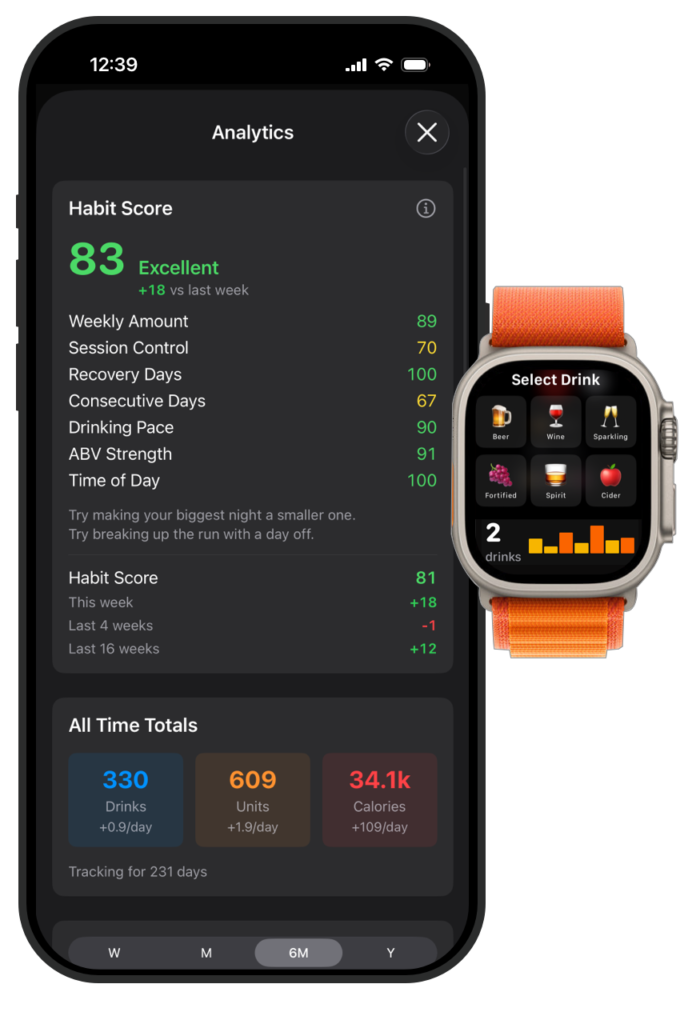
Our new habit score that uses advanced algorithms to workout the kind of drinking habit you have and how to improve your overall drinking consumption. Building better habits for healthier drinking patterns.
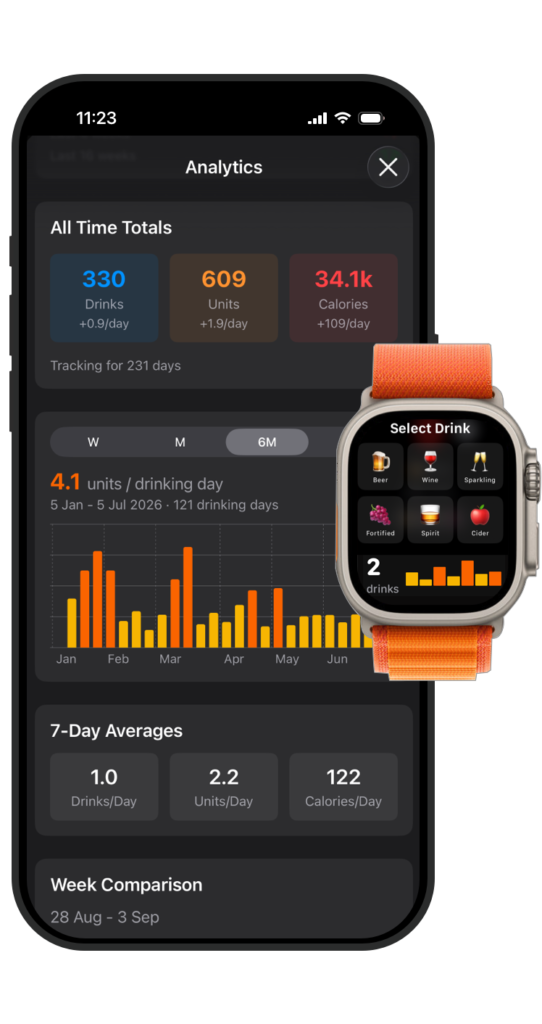
Progress Graph
Our new progress bar allows you to instantly see your progress over the past week, month, 6 months and the past year.
Colour coded bars show when your sessions are low, medium or high.
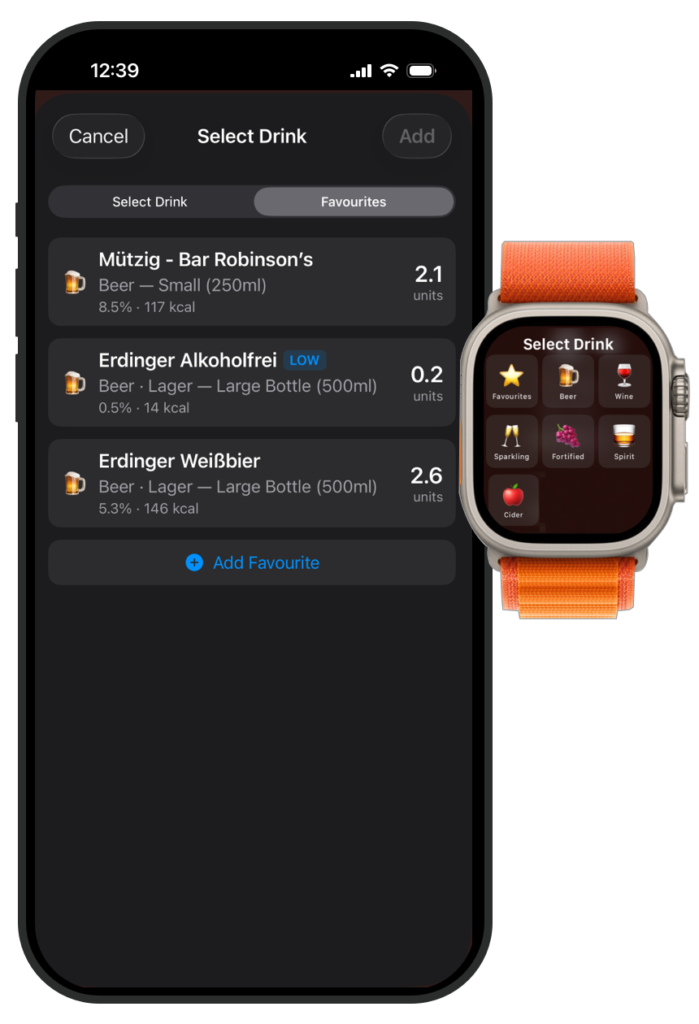
Favourites
This version of Alcotap introduces your Favourite drinks. In addition you can also selected this from your connected smart watch. We have also introduced Low Alcohol and Alcohol Free drink support.
Aligned with Local Guidelines
All our features are aligned with local government guidelines.
Alcotap is an Alcohol logging app that correctly calculates the real units of alcohol for your location giving you real data on your drinking habits.
Alcotap
Like many apps I have developed through Core Coders, it all started with a simple question:
“I wonder how much I’m really drinking?”
At first, you might imagine that tracking alcohol consumption would be straightforward.
I downloaded and tested many of the leading alcohol tracking apps available, but they all had things I didn’t like:
Overly complicated interfaces.
Poor alignment with local drinking guidelines and common drink sizes.
Privacy concerns, with data being stored on external servers.
A preachy or judgemental tone.
Inaccurate unit calculations and limited data export options.
No support for wearable devices.
Expensive subscription costs.
Inconsistent weekly reporting, with some apps starting the week on Monday and others on Sunday, making it difficult to compare drinking habits consistently.
What I wanted was a convenient way to quickly add a drink — ideally from my wrist — and do so discreetly when necessary.
I was also strongly against requiring users to create an account. Your alcohol consumption is personal information, and it should remain as private as you want it to be.
Most people underestimate how much alcohol they drink. I certainly did — by at least 50%. Since using Alcotap, I have reduced my own alcohol consumption.
I also wanted the app to align with the health guidelines of the country where you live, while correctly handling local drink sizes and measurements.
Finally, I wanted a simple way to see whether I was drinking more or less over a week, a month, or even an entire year.
Alcotap User Interface
Keep it Simple
The main display focuses on the last seven days and provides:
Quick drink selection and entry.
A colour-coded chart showing your current week’s consumption.
Weekly units and calorie totals.
Instant visual feedback through background colours and drink counters when local guideline thresholds are exceeded.
The goal is to provide meaningful information at a glance.
Analytics
One thing I found frustrating with other apps was that the history screens didn’t provide enough meaningful feedback.
In Alcotap, entries are colour-coded to help highlight periods of heavier drinking and indicate when local guideline thresholds have been exceeded.
History can be viewed by day, and drinks can be added, edited, or deleted whenever necessary.
What Data do you collect on me?
Absolutely nothing.
There is no login so all your data remains private on your device. You can make backups using the backup and restore features within the app.
What does it cost?
Basic functionality such as logging and viewing your drink history and providing realtime weekly limit are all free.
You can also view your current status on your watch using our Wear and watchOS apps.
The subscription allows you to edit and modify historical data, use the watch app to select drinks discreetly and finally we offer advanced rolling 4 and 8 weeks graphs providing you with a simple way of tracking your drinking.
Who is aimed at?
Health conscious drinkers who want to know exactly how much alcohol they are consuming. Alcotap accurately works out your alcohol consumption in local units and provides colour coded screens to help identify if you are drinking too much.
We are not here to judge but simply provide the truth about how much alcohol you are consuming.
It’s about building better habits by monitoring your consumption. For some seeing these accurate numbers is enough to reduce their alcohol consumption – for others they may need support from friends of groups.
If however you think you or a friend has an alcohol problem then you should seek professional medical help or a local Alcoholics Anonymous group.
Sport & Health Technologies
We use cookies on our website to give you the most relevant experience by remembering your preferences and repeat visits. By clicking “Accept All”, you consent to the use of ALL the cookies. However, you may visit "Cookie Settings" to provide a controlled consent.
This website uses cookies to improve your experience while you navigate through the website. Out of these, the cookies that are categorized as necessary are stored on your browser as they are essential for the working of basic functionalities of the website. We also use third-party cookies that help us analyze and understand how you use this website. These cookies will be stored in your browser only with your consent. You also have the option to opt-out of these cookies. But opting out of some of these cookies may affect your browsing experience.
Necessary cookies are absolutely essential for the website to function properly. These cookies ensure basic functionalities and security features of the website, anonymously.
Cookie
Duration
Description
cookielawinfo-checkbox-analytics
11 months
This cookie is set by GDPR Cookie Consent plugin. The cookie is used to store the user consent for the cookies in the category "Analytics".
cookielawinfo-checkbox-functional
11 months
The cookie is set by GDPR cookie consent to record the user consent for the cookies in the category "Functional".
cookielawinfo-checkbox-necessary
11 months
This cookie is set by GDPR Cookie Consent plugin. The cookies is used to store the user consent for the cookies in the category "Necessary".
cookielawinfo-checkbox-others
11 months
This cookie is set by GDPR Cookie Consent plugin. The cookie is used to store the user consent for the cookies in the category "Other.
cookielawinfo-checkbox-performance
11 months
This cookie is set by GDPR Cookie Consent plugin. The cookie is used to store the user consent for the cookies in the category "Performance".
viewed_cookie_policy
11 months
The cookie is set by the GDPR Cookie Consent plugin and is used to store whether or not user has consented to the use of cookies. It does not store any personal data.
Functional cookies help to perform certain functionalities like sharing the content of the website on social media platforms, collect feedbacks, and other third-party features.
Performance cookies are used to understand and analyze the key performance indexes of the website which helps in delivering a better user experience for the visitors.
Analytical cookies are used to understand how visitors interact with the website. These cookies help provide information on metrics the number of visitors, bounce rate, traffic source, etc.
Advertisement cookies are used to provide visitors with relevant ads and marketing campaigns. These cookies track visitors across websites and collect information to provide customized ads.